 UK Passport Photo: Size, Requirements & Free Maker
 UK Passport Photo requirements (2026)
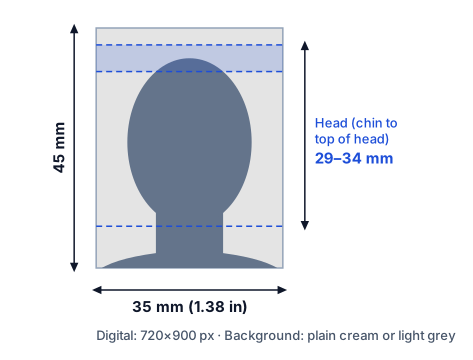
| Photo size | 35 × 45 mm (1.38 × 1.77 in) |
|---|---|
| Head height (chin to crown) | 29 – 34 mm |
| Digital size | 720 × 900 px (accepted: at least 600×750 px) |
| File size | 50 KB – 10 MB |
| Format | JPEG (.jpg), colour |
| Background | Plain cream or light grey |
| Glasses | Avoid if possible. Never sunglasses or tinted lenses; frames and glare must not cover the eyes. |
✔ Based on the official source: GOV.UK – Photos for passports. Last checked October 2026.
Good to know
- Taken within the last month.
- Printed photos: 2 identical, on plain white photo paper, no border.
- Head coverings only for religious or medical reasons.
For online applications the passport service may crop the photo again — that is normal.
UK Passport Photo size in cm, inches and pixels
| Millimetres | 35 × 45 mm |
|---|---|
| Centimetres | 3.5 × 4.5 cm |
| Inches | 1.38 × 1.77 in |
| Pixels for online upload | 720 × 900 px (accepted: at least 600×750 px) |
| Pixels for printing (300 DPI) | 413 × 531 px |
| Pixels for printing (600 DPI) | 827 × 1063 px |
| Aspect ratio (width:height) | 7:9 |
| File size | 50 KB–10 MB |
How to make your United Kingdom passport photo at home
- Take the photo. Stand in front of a plain wall in soft daylight. Have someone take the picture at eye level, showing your head and shoulders.
- Upload it above. The tool finds your face, straightens it, removes the background and sizes your head to 29–34 mm.
- Check and adjust. Use the guides and the photo check. Drag or use the sliders if you want a different crop.
- Download. Get the 720 × 900 px file for online forms, or a 4×6 in / A4 sheet to print and cut.
Common reasons a United Kingdom passport photo is rejected
- Shadows on the face or behind the head.
- Head too big or too small — the head height must be 29–34 mm.
- Smiling, mouth open, or eyes not clearly visible.
- Glare on glasses, or hair covering the eyes or eyebrows.
- Blurry, low-resolution, or heavily filtered photos (no beauty filters).
- An old photo — most countries want one taken within the last 6 months.
Frequently asked questions
What size is a United Kingdom passport photo?
35 × 45 mm (3.5 × 4.5 cm, or 1.38 × 1.77 in). The head, measured from the chin to the top of the head, must be 29–34 mm tall.
What is the United Kingdom passport photo size in pixels?
For online applications use 720 × 900 px (accepted: at least 600×750 px), file size 50 KB–10 MB. For printing, the photo is 413 × 531 px at 300 DPI. The downloads from this tool are already at these sizes.
Is there a free United Kingdom passport photo checker?
Yes — the tool above checks your photo after you upload it: head size, head tilt, facing the camera, eyes open, neutral expression and resolution. It flags problems before you submit, though only the issuing authority can make the final decision.
What background colour is required?
Plain cream or light grey, with no shadows, patterns or objects. The tool replaces your background automatically.
Can I wear glasses?
Avoid if possible. Never sunglasses or tinted lenses; frames and glare must not cover the eyes.
Can I take the photo with my phone?
Yes. Ask someone to take it at eye level from about 1.2 m away, in soft even light, against any plain wall. Upload it here and the tool crops, sizes and cleans the background. Then download the digital file or print the sheet.
How do I print it?
Download the 4×6 in or A4 print sheet and print it at 100% (“actual size”) on photo paper — at home or at any photo kiosk. Cut along the grey lines.